Computer Architecture I @ ShanghaiTech University
Getting Started
Download the files for lab6 first.
Exercises
Exercise 1: FSM
Load the given starter file ex1.circ into Logisim. Modify this circuit's subcircuits StateBitZero and StateBitOne to implement this Moore FSM: Detecting 010 pattern in a bit sequence (use overlapping). Show this completed circuit to your TA (remember to save!)
Note that the FSM is implemented by the following diagram (the four state names 00, 01, 10, 11 are just names written in binary - they have no direct relationship with the actual zeros and ones of the FSM input/output). Take some time to understand how this diagram implements the FSM.
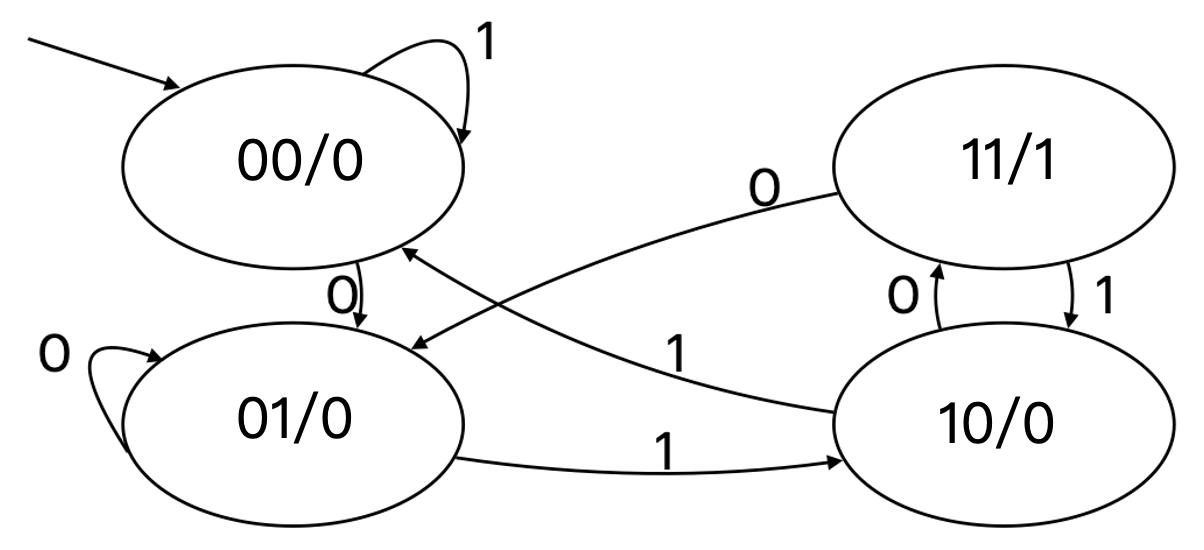
Observe that the following is a truth table for the FSM (convince yourself of this):
| st1 | st0 | input | next st1 | next st0 | output |
|---|---|---|---|---|---|
| 0 | 0 | 0 | 0 | 1 | 0 |
| 0 | 0 | 1 | 0 | 0 | 0 |
| 0 | 1 | 0 | 0 | 1 | 0 |
| 0 | 1 | 1 | 1 | 0 | 0 |
| 1 | 0 | 0 | 1 | 1 | 0 |
| 1 | 0 | 1 | 0 | 0 | 0 |
| 1 | 1 | 0 | 0 | 1 | 1 |
| 1 | 1 | 1 | 1 | 0 | 1 |
We've provided you with a starter Logisim circuit to start out in ex1.circ.
Note that the top level of the circuit looks almost exactly the same as our previous adder circuit, but now there's a FSMLogic block instead of an adder block. FSMLogic is the combinational logic block for this FSM. We have handled the output bit for you. You should complete the circuit by completing the StateBitOne and StateBitZero subcircuits, which produces the next state bits.
Check-off
- Show your
StateBitZerocircuit &StateBitOnecircuit to your TA and demonstrate that they behave correctly.
Exercise 2: Introduction to RV32 CPU - PC Circuit
Load the given starter file ex2.circ into Logisim and implement a PC circuit. Show this completed circuit to your TA (remember to save!)
Functionality
- Instruction Address Tracking: The PC holds the address of the next instruction to be executed. In most cases, the PC increments by 4 (since RV32I instructions are 32 bits wide, or 4 bytes) each clock cycle, pointing to the next sequential instruction.
- Jump and Branch Support: When a jump or branch instruction is encountered, the PC is updated to the new target address instead of simply incrementing.
- Exception and Interrupt Handling: In the event of an exception or interrupt, the PC is updated to the entry address of the exception handler or interrupt service routine. We will cover this in future lectures.
Input Ports
- Clock Signal (
clk): The clock signal synchronizes the update of the PC. On each clock cycle's rising edge, the PC updates its value based on control signals. - Reset Signal (
reset): The reset signal initializes the PC to its default value (typically0x00000000). - PC Update Signal (
pc_update): This signal indicates whether the PC needs to be updated. It serves as a control signal for a multiplexer, selecting the next value for the PC (e.g., sequential increment, jump address, branch address, etc.). - New Address Input (
new_addr): When the PC needs to be updated to a new address (e.g., during a jump, branch, exception or interrupt), the target address is provided through this input port.
Output Ports
- Current Address Output (
current_addr): The PC outputs the currently held instruction address, which is sent to the instruction memory to fetch the next instruction to be executed.
Details
In this lab, all instructions are a fixed 32 bits in length, meaning that instructions must be aligned on a 4-byte boundary in memory. But sometimes, an instruction-address-misaligned exception is generated on a taken branch or unconditional jump if the target address is not 4-byte aligned. In this case, it needs to be automatically rounded down to 4-byte alignment. For example, if the target address is 0x000000A3, you need to align it to 0x000000A0.
Check-off
- Show
ex2.circto your TA, and explain:- The architecture of your circuit.
- How your circuit handles the misaligned address.
The following TA(s) are responsible for this lab: Chaofan Li <lichf2025@shanghaitech.edu.cn>